Hello forum,
After it had been sitting on my shelf for a while I decided to press it back in to service. I instaleld muvirt via the baremetal appliance store.
I created a few vms from the appliance store. They are however not starting.
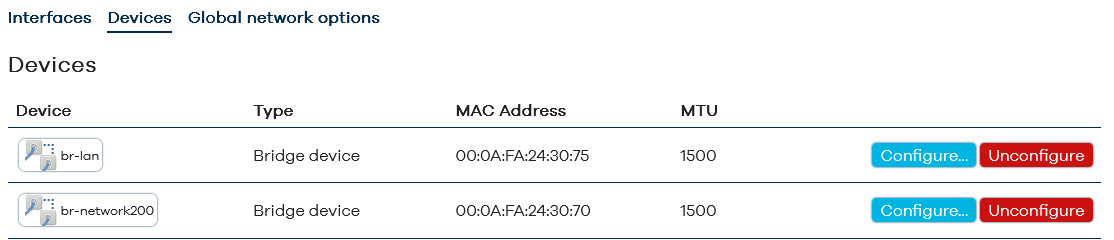
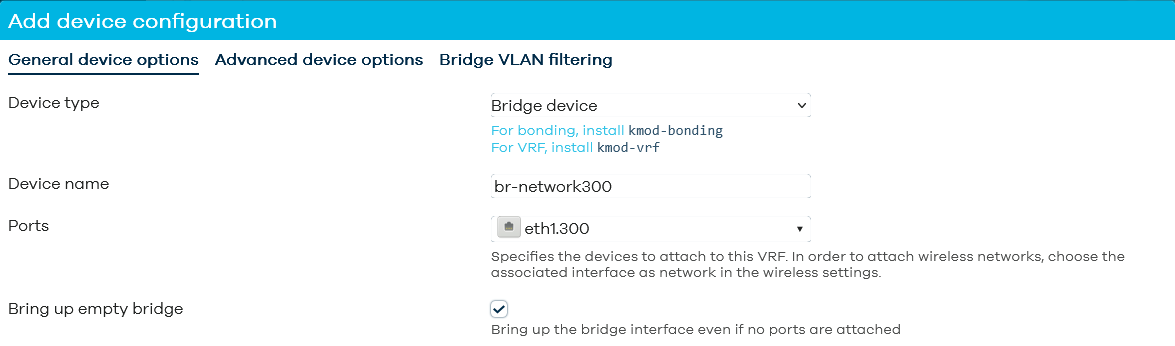
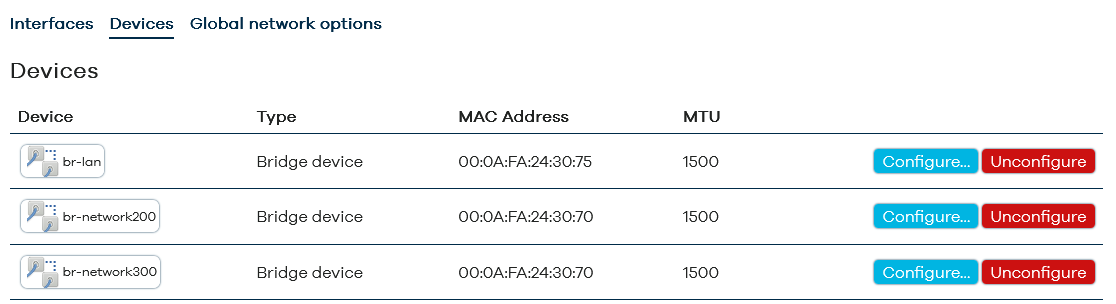
I create the following network config:
On eth8 I have two vlean devices eth8.100 and eth8.101
On these I created bridges: br100 and br101
And attached to these I create interfaces named VLAN100 and VLAN101.
I define a VM, and attach it to VLAN100. When I start I see the. following error in the logs:
Sat Feb 21 12:39:04 2026 daemon.info muvirt-provision[21167]: Starting VM ubuntujammy
Sat Feb 21 12:39:04 2026 daemon.info virt: starting vm instance ubuntujammy section ubuntujammy type aarch64 machine virt,gic-version=3
Sat Feb 21 12:39:04 2026 daemon.info virt: using QEMU qemu-system-aarch64
Sat Feb 21 12:39:04 2026 daemon.info muvirt-provision[21167]: Disk 0: /dev/mapper/vmdata-ubuntujammy,serial=188494F3
Sat Feb 21 12:39:04 2026 daemon.info muvirt-provision[21167]: Network 0: VLAN100
Sat Feb 21 12:39:04 2026 daemon.info muvirt-provision[21167]: MAC: 52:54:00:0c:a5:f4
Sat Feb 21 12:39:04 2026 daemon.err qemu-system-aarch64[21397]: qemu-system-aarch64: -chardev socket,server,nowait,path=/tmp/qemu-qga-ubuntujammy,id=qga0: warning: short-form boolean option ‘server’ deprecated
Sat Feb 21 12:39:04 2026 daemon.err qemu-system-aarch64[21397]: Please use server=on instead
Sat Feb 21 12:39:04 2026 daemon.err qemu-system-aarch64[21397]: qemu-system-aarch64: -chardev socket,server,nowait,path=/tmp/qemu-qga-ubuntujammy,id=qga0: warning: short-form boolean option ‘nowait’ deprecated
Sat Feb 21 12:39:04 2026 daemon.err qemu-system-aarch64[21397]: Please use wait=off instead
Sat Feb 21 12:39:04 2026 daemon.err qemu-system-aarch64[21397]: WARNING: Image format was not specified for ‘/dev/mapper/vmdata-ubuntujammy’ and probing guessed raw.
Sat Feb 21 12:39:04 2026 daemon.err qemu-system-aarch64[21397]: Automatically detecting the format is dangerous for raw images, write operations on block 0 will be restricted.
Sat Feb 21 12:39:04 2026 daemon.err qemu-system-aarch64[21397]: Specify the ‘raw’ format explicitly to remove the restrictions.
Sat Feb 21 12:39:04 2026 daemon.info ModemManager[21437]: hotplug: add network interface tap0: event processed
Sat Feb 21 12:39:04 2026 daemon.err qemu-system-aarch64[21397]: failed to get mtu of bridge `br-VLAN100’: No such device
Sat Feb 21 12:39:04 2026 daemon.info : 11[KNL] interface tap0 deleted
Sat Feb 21 12:39:04 2026 daemon.info ModemManager[21461]: hotplug: remove network interface tap0: event processed
Sat Feb 21 12:39:04 2026 daemon.err qemu-system-aarch64[21397]: qemu-system-aarch64: -netdev tap,id=VLAN1000,helper=/usr/lib/qemu-bridge-helper --br=**br-VLAN100,**vhost=on: bridge helper failed
Sat Feb 21 12:39:09 2026 daemon.info muvirt-provision[21167]: vm
Sat Feb 21 12:39:09 2026 user.notice muvirt-provision: [ubuntujammy] First time boot failed to start qemu, check system log for details
Sat Feb 21 12:39:09 2026 daemon.err muvirt-provision[21167]: muvirt-provision: [ubuntujammy] First time boot failed to start qemu, check system log for details
Sat Feb 21 12:39:09 2026 daemon.info muvirt-provision[21167]: vm
Sat Feb 21 12:39:09 2026 user.notice muvirt-provision: [ubuntujammy] First VM boot failed
Sat Feb 21 12:39:09 2026 daemon.err muvirt-provision[21167]: muvirt-provision: [ubuntujammy] First VM boot failed
This looks as if the correct bridge is not found. But how do I configure the VM with the correct bridge?
notice how it is looking for a bridge named br-VLAN100, which does not exist…